
ZEvents Invite Maker Hobnob
ZazzleEvents
4.42.24K Reviews
- Version
- 4.3.20
- Installs
- 500.00K
- Age Rating
- Everyone
Screenshots

Our Review of ZEvents Invite Maker Hobnob
 Analysis by Appyee
Have you ever found yourself scrambling at the last minute to create an invitation for an event? Whether it's a birthday bash, a dinner party, or just a casual get-together, Hobnob - Invitation Card Maker has got you covered. I recently took it for a spin, and let me tell you, I was pleasantly surprised by how easy and fun it made the whole process. Let me walk you through my experience with this app.
Getting Started with Hobnob
First things first, downloading Hobnob from the App Store was a breeze. It's available for both Android and iOS, so no worries if you're switching devices. Once installed, I was greeted with a clean and intuitive interface. The app doesn't bombard you with unnecessary information, which is a relief.
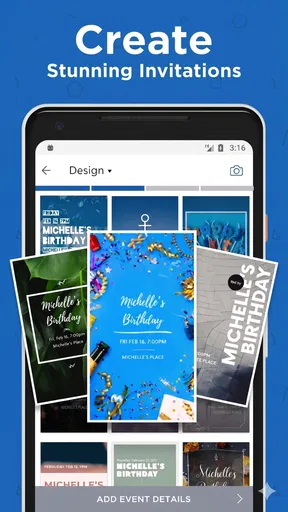
Creating an invitation is straightforward. You can start from scratch or choose from a plethora of templates. The templates are classy and varied, catering to different tastes and occasions. I was particularly fond of the "Rustic Chic" design for its simplicity and elegance.
Design and Customization
One of the highlights of Hobnob is its customization options. After picking a template, you can tweak almost everything to your liking. Change the fonts, colors, and even the layout. I spent a good chunk of time playing around with these features, and honestly, it was a blast.
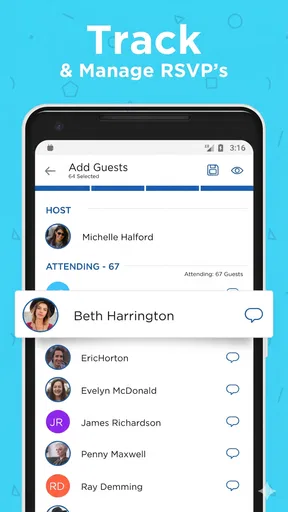
Adding details to the invitation is as easy as pie. Inputting the event's date, time, and location is seamless, and you can even add a personal message to your guests. The app also allows you to include RSVP options, which is super handy for keeping track of attendees.
Sharing Made Simple
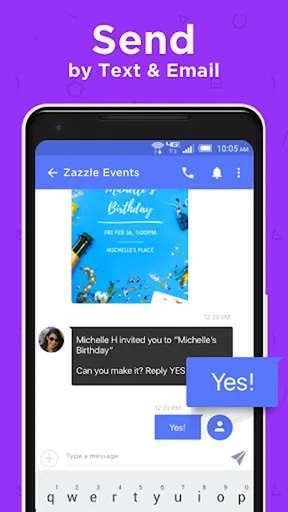
Once your masterpiece is ready, Hobnob makes sharing it a breeze. You can send invitations via text, email, or even through social media platforms. The app integrates with your contact list, so there's no need to manually enter each guest's information. Just tap, select, and send. Easy peasy!
Besides, the app provides real-time updates on who has viewed and responded to your invitation. This feature is a lifesaver for those who like to stay organized and on top of things.
Features That Stand Out
One of the standout features of Hobnob is the ability to create events with recurring reminders. This is perfect for those who host regular meetings or events. Set it once, and the app will take care of the rest.
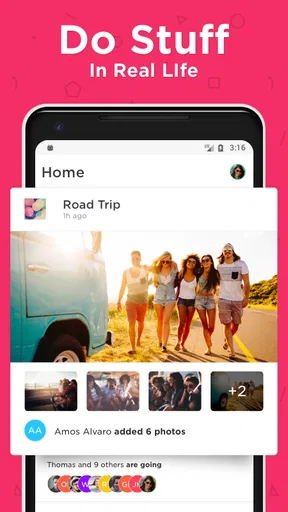
Another nifty addition is the ability to add a photo gallery. You can share memories from past events or simply set the mood for the upcoming one. This feature adds a personal touch that guests will surely appreciate.
Is Hobnob Right for You?
If you're someone who frequently hosts events or simply enjoys the convenience of digital invites, Hobnob is worth considering. It's user-friendly, packed with features, and makes the process of creating and sending invitations almost effortless.
However, if you're looking for something ultra-specific or heavily customizable beyond what's offered, you might need to explore additional options. But for most casual users, Hobnob provides everything you need in one neat package.
In the end, Hobnob - Invitation Card Maker is a delightful tool that simplifies the art of inviting. Whether you're planning a big event or just a cozy gathering, this app ensures your invites are as impressive as the event itself. Happy inviting!
Privacy and Permissions
See what permissions an app requests and how it handles your data.
- Identity
- find accounts on the device
- Contacts
- find accounts on the device, read your contacts, modify your contacts
- Location
- approximate location (network-based), precise location (GPS and network-based)
- Phone
- read phone status and identity
- Photos/Media/Files
- read the contents of your USB storage, modify or delete the contents of your USB storage
- Storage
- read the contents of your USB storage, modify or delete the contents of your USB storage
- Wi-Fi connection information
- view Wi-Fi connections
- Device ID & call information
- read phone status and identity
- Other
- view network connections, full network access, run at startup, control vibration, prevent device from sleeping
Verdict
Strengths of ZEvents Invite Maker Hobnob
- Easy to navigate interface.
- Variety of customizable templates.
- Instant RSVP tracking feature.
- Integrates with calendar apps.
- No ads in the free version.
Limitations of ZEvents Invite Maker Hobnob
- Limited features for free users.
- Occasional bugs in notification delivery.
- Some templates feel outdated.
- Requires an account to use.
- No offline editing capability.
Similar Picks in This Category
View All
Easy Quran Mp3 Audio Offline
Muslim Worldapp4.7

Invitation Maker: Cards & RSVP
Greetings Island4.9

StubHub - Live Event Tickets
StubHub4.3

Fever: Events & Tickets
Fever Labs4.7

Epic Freebie Games Radar
Arioch Pds - Apps & Games4.4

Invitation card Maker, Design
Splendid App Maker4.9
Frequently Asked Questions
What features does Hobnob - Invitation Card Maker offer?
Hobnob provides a range of features including customizable invitation templates, RSVP tracking, and the ability to send invites via text or email. Users can also create events, manage guest lists, and send reminders. The app supports multimedia attachments, allowing you to personalize invitations with photos and videos.
Is Hobnob available for both Android and iOS devices?
Yes, Hobnob is available for download on both Android and iOS platforms. You can find the app on the Google Play Store for Android devices and the Apple App Store for iOS devices, making it accessible for a wide range of users.
Does Hobnob require an internet connection to function?
Hobnob requires an internet connection to send and receive invitations, track RSVPs, and update event details. While you can design invitations offline, features like sending invites and receiving updates necessitate a connection to the internet.
Are there any costs associated with using Hobnob?
Hobnob offers both free and premium versions. The free version includes basic features, while the premium version provides additional functionalities such as advanced customization options, ad-free experience, and priority customer support. Pricing for the premium version can be found within the app.
How secure is my data on Hobnob?
Hobnob implements security measures to protect user data, including encryption and secure servers. The app is designed to ensure privacy, but users should always review the privacy policy and terms of service to understand how their information is handled.
